 CleanTable
All tables of a page into one XLSX
Pro saves every table on the page into one Excel workbook — one sheet per table, with real numbers, dates and a clean header.
- Free, no row limit
- Runs locally
- Chrome & Edge
What you get
- One click, one workbook. Right-click → CleanTable → All tables → one XLSX (Pro). Each table becomes its own sheet.
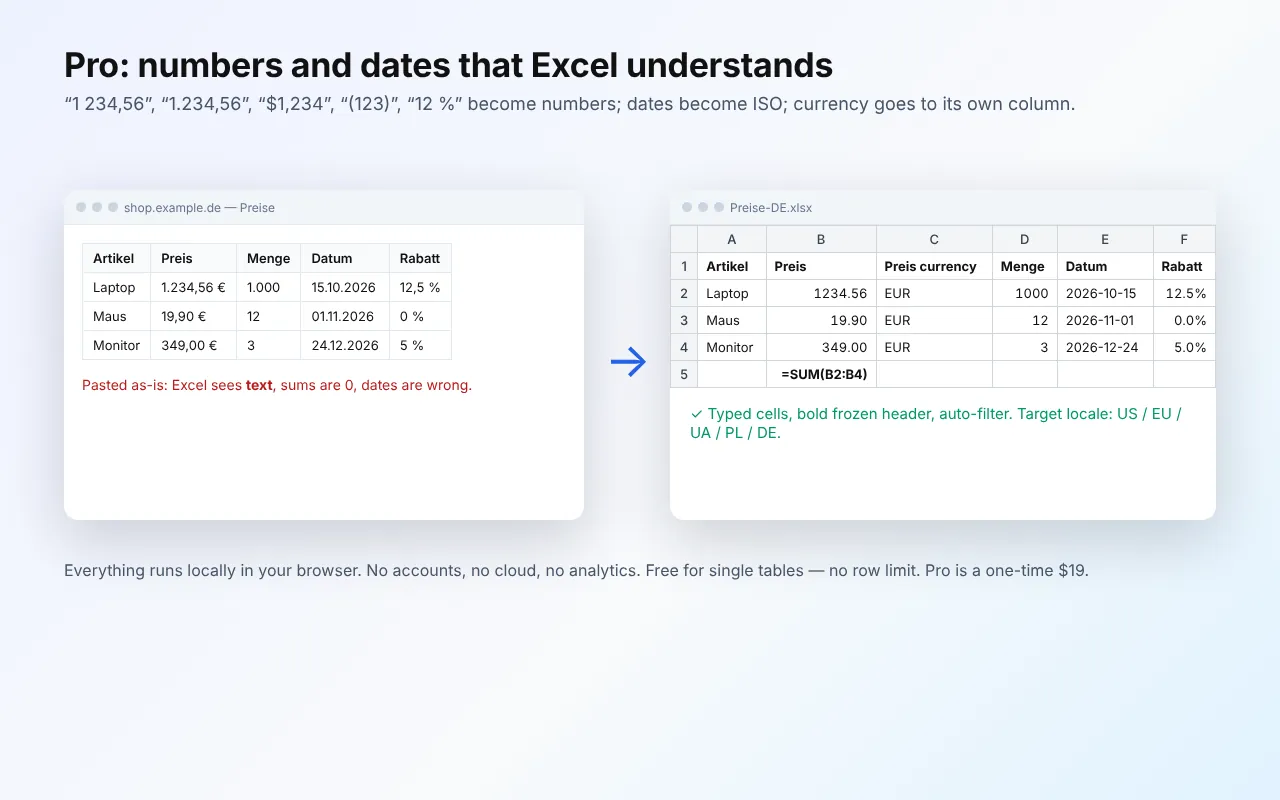
- Typed cells. Numbers, dates, booleans and percentages are written as real Excel types, so sums and filters work immediately.
- Tidy by default. Bold frozen header row, auto-filter and sensible column widths.
- Markdown alternative. The same action can produce one Markdown document with every table on the page.
CleanTable writes the XLSX itself, in your browser. Nothing is uploaded to a server.
Number and date normalisation
Per column, CleanTable decides whether 1,234 is a thousand or a decimal, and turns 1 234,56, 1.234,56, $1,234, (123) and 12 % into numbers. Dates such as DD.MM.YYYY, MM/DD/YYYY or 3 Jan 2026 become ISO dates. Currency symbols go into a separate <column> currency column.
Merge paginated tables
For tables split over several pages, use Add page to merge on each page, then copy or download the merged result. Duplicate rows are removed.
Pricing
Pro is a one-time payment — ₴790 (about $19) — with free updates and no subscription; one key works in up to 3 browsers. There is also a one-year key for ₴490 and a Team plan with 5 seats. See pricing and the 14-day refund policy.
What stays free
Copying a single table to Excel or Sheets, CSV, Markdown and JSON, with no row limit, remains free. Pro is for the power-user conveniences above.
Frequently asked questions
Is a single-table XLSX download free?
XLSX download is part of Pro. For a single table, CSV download and copy-paste into your spreadsheet are free.
Do I need an account?
No. You buy a licence key and paste it in Settings; it is verified offline.
Can I get a refund?
Yes, within 14 days of payment — see the refund policy.
Related
Copy your next table the clean way
Free for single tables, no row limit, no account. Pro is a one-time payment.
Add to Chrome — it’s free