 CleanTable
Copy a web table to Excel — by columns
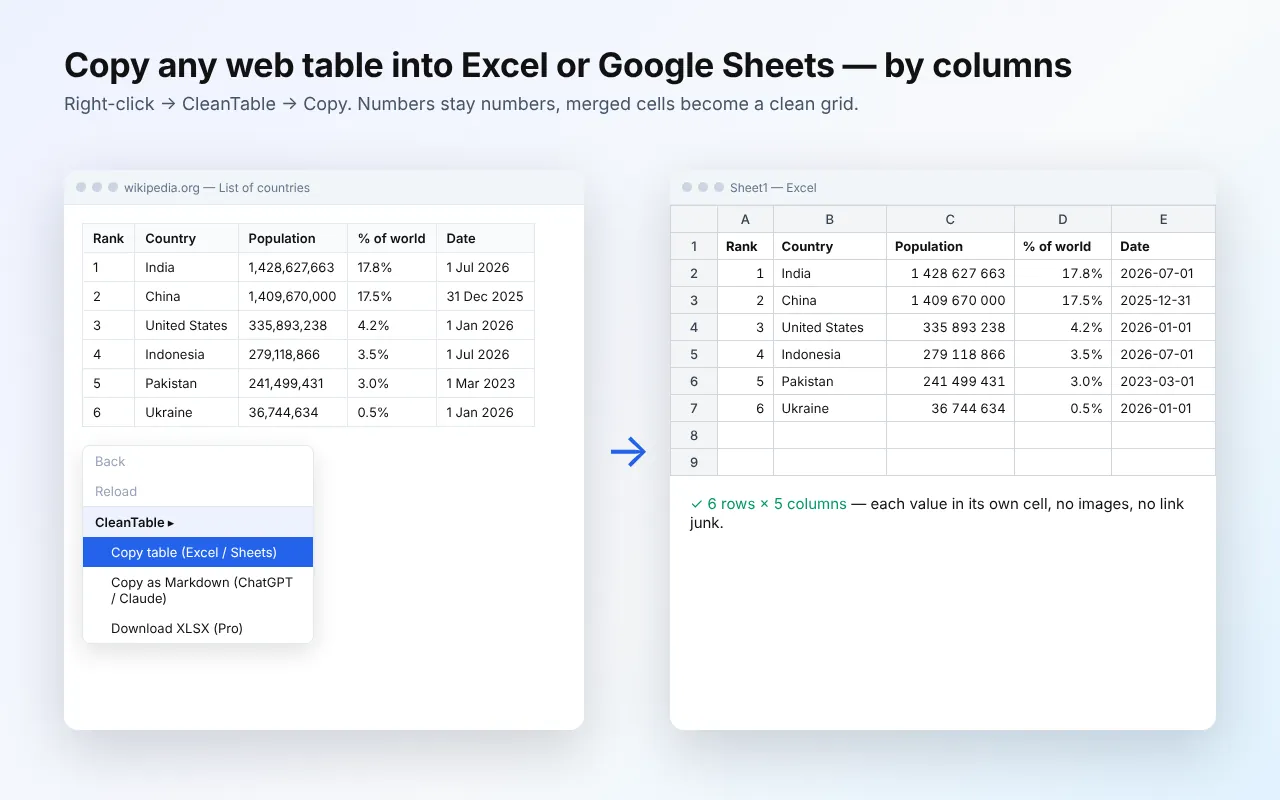
Right-click the table, choose Copy table, press Ctrl+V in Excel. Every value lands in its own cell, headers are detected and merged cells are expanded.
- Free, no row limit
- Runs locally
- Chrome & Edge
Why a normal copy-paste goes wrong
A browser copies what a page looks like. Many sites build tables out of nested <div> elements, load rows with JavaScript, merge cells with rowspan and colspan, and put icons, links and hidden helper text inside cells. Excel then guesses: you get one giant cell, shifted columns or extra junk.
How to copy a web table to Excel with CleanTable
- Install the free extension from the Chrome Web Store.
- Right-click the table and pick CleanTable → Copy table (Excel / Sheets). On a page with several tables, a picker highlights them so you can click the one you want.
- Click a cell in Excel and press Ctrl+V (⌘V on Mac).
- Optional: open the toolbar popup first to preview the table, click a column header to leave that column out, or untick First row is header.
Prefer the keyboard? Alt+Shift+T copies the table under the cursor.
What CleanTable cleans for you
- images and icons are dropped (or replaced by their alt text);
- links become plain text (or
text | URL, or the URL — your choice); - checkboxes become
true/false; - non-breaking spaces and zero-width characters are removed;
- hidden rows and cells are skipped;
- merged cells (
rowspan/colspan) are expanded into a clean rectangle; - multi-row headers are joined into one header row.
It reads the page after it has rendered, so tables built by JavaScript, ARIA grids and div-based grids work as well as classic <table> elements, including those inside iframes and shadow DOM.
When Excel still treats numbers as text
If a site prints 1 234,56 or 1.234,56 and your Excel is set to a different locale, the text can arrive as text. Pro normalises numbers and dates per column (US, EU, UA, PL, DE formats) and writes typed XLSX files. See the guide on numbers pasted as text.
Free and Pro
| Feature | Free | Pro (one-time) |
|---|---|---|
| Copy a table to Excel / Sheets by columns | Yes, no row limit | Yes |
| CSV, Markdown, JSON; download CSV | Yes | Yes |
| Preview, exclude columns, header toggle | Yes | Yes |
| All tables of a page into one XLSX | – | Yes |
| Merge paginated tables from several pages | – | Yes |
| Capture virtualised / infinite-scroll grids | – | Yes |
| Number and date normalisation, typed XLSX | – | Yes |
Details and prices on the pricing page.
Frequently asked questions
Is there a row limit?
No. Copying a single table to Excel, Sheets, CSV, Markdown or JSON is free with no row limit.
Does it work with tables that load with JavaScript?
Yes. CleanTable runs in the page after it has rendered, so it sees the same table you see. For tables that render rows only while you scroll, use Pro’s grid capture.
Which spreadsheet apps can I paste into?
CleanTable puts plain text (tab-separated) and an HTML flavour on the clipboard, so Excel, Numbers and LibreOffice Calc keep the columns. Google Sheets works too — see copy a table to Google Sheets.
Related
Copy your next table the clean way
Free for single tables, no row limit, no account. Pro is a one-time payment.
Add to Chrome — it’s free